> ## Documentation Index
> Fetch the complete documentation index at: https://docs.basic.tech/llms.txt
> Use this file to discover all available pages before exploring further.
# Set up the Basic CLI (optional)
> Using the CLI or code editor LLMs to manage projects.
## Install the CLI
First, install the CLI using your terminal.
```bash theme={null}
npm i -g @basictech/cli
```
Run `basic login` to create your basic admin account. You will be redirected to a web page to login.
```bash theme={null}
basic login
```
# Create / integrate a project
Navigate to your project directory and run `basic init` to create your project.
```bash theme={null}
cd project-name
```
```bash theme={null}
basic init
```
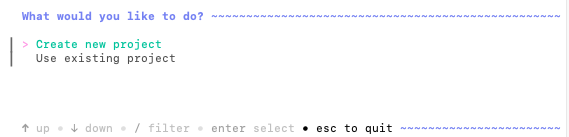
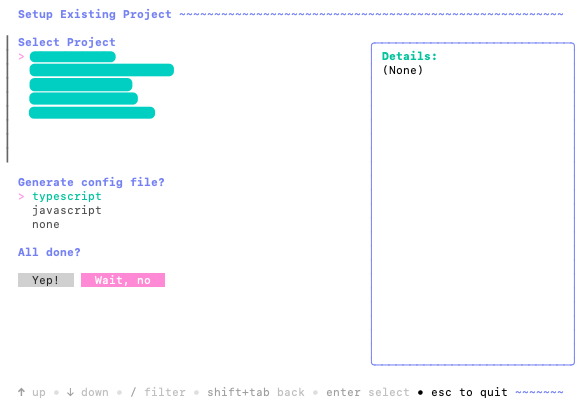
You will be prompted to choose between creating a new project or integrating an existing project.
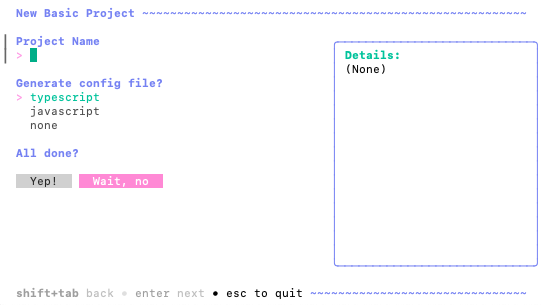
 Choose your tech stack and project name.
 That's it! You now have a new project created. You'll even notice a new `basic.config.ts` / `basic.config.js` file in your project directory with your project ID included!
If you run `basic init` in a codebase with an existing `basic.config.ts` file (e.g., created using via [create-lofi-app](/basic-react/create-lofi-app)), you'll notice that the project\_id in your `basic.config.ts` file gets automatically updated.
# Other CLI commands
**View all commands**
```bash theme={null}
basic help
```
Other commands include:
* `basic account` - Show account information
* `basic logout` - logout from your basic account
* `basic status` - Show login status
* `basic projects` - list your projects
* `basic version` - Show CLI version
* `basic update` - Update CLI to the latest version
* `basic debug` - Show Basic config directory location
That's it! You now have a new project created. You'll even notice a new `basic.config.ts` / `basic.config.js` file in your project directory with your project ID included!
If you run `basic init` in a codebase with an existing `basic.config.ts` file (e.g., created using via [create-lofi-app](/basic-react/create-lofi-app)), you'll notice that the project\_id in your `basic.config.ts` file gets automatically updated.
# Other CLI commands
**View all commands**
```bash theme={null}
basic help
```
Other commands include:
* `basic account` - Show account information
* `basic logout` - logout from your basic account
* `basic status` - Show login status
* `basic projects` - list your projects
* `basic version` - Show CLI version
* `basic update` - Update CLI to the latest version
* `basic debug` - Show Basic config directory location