> ## Documentation Index
> Fetch the complete documentation index at: https://docs.basic.tech/llms.txt
> Use this file to discover all available pages before exploring further.
# Basic Auth
> Overview of the Basic Auth
This is primarily for developers using the Basic API. The client SDKs handle all these aspects of OAuth 2.0 for you.
# Introduction to OAuth 2.0
Basic uses OAuth 2.0 for authentication. This widely adopted framework allows users to securely grant permissions to multiple applications using a single account, similar to "Login with Google". It ensures user data security while enabling controlled access for third-party apps, without directly handling sensitive login credentials.
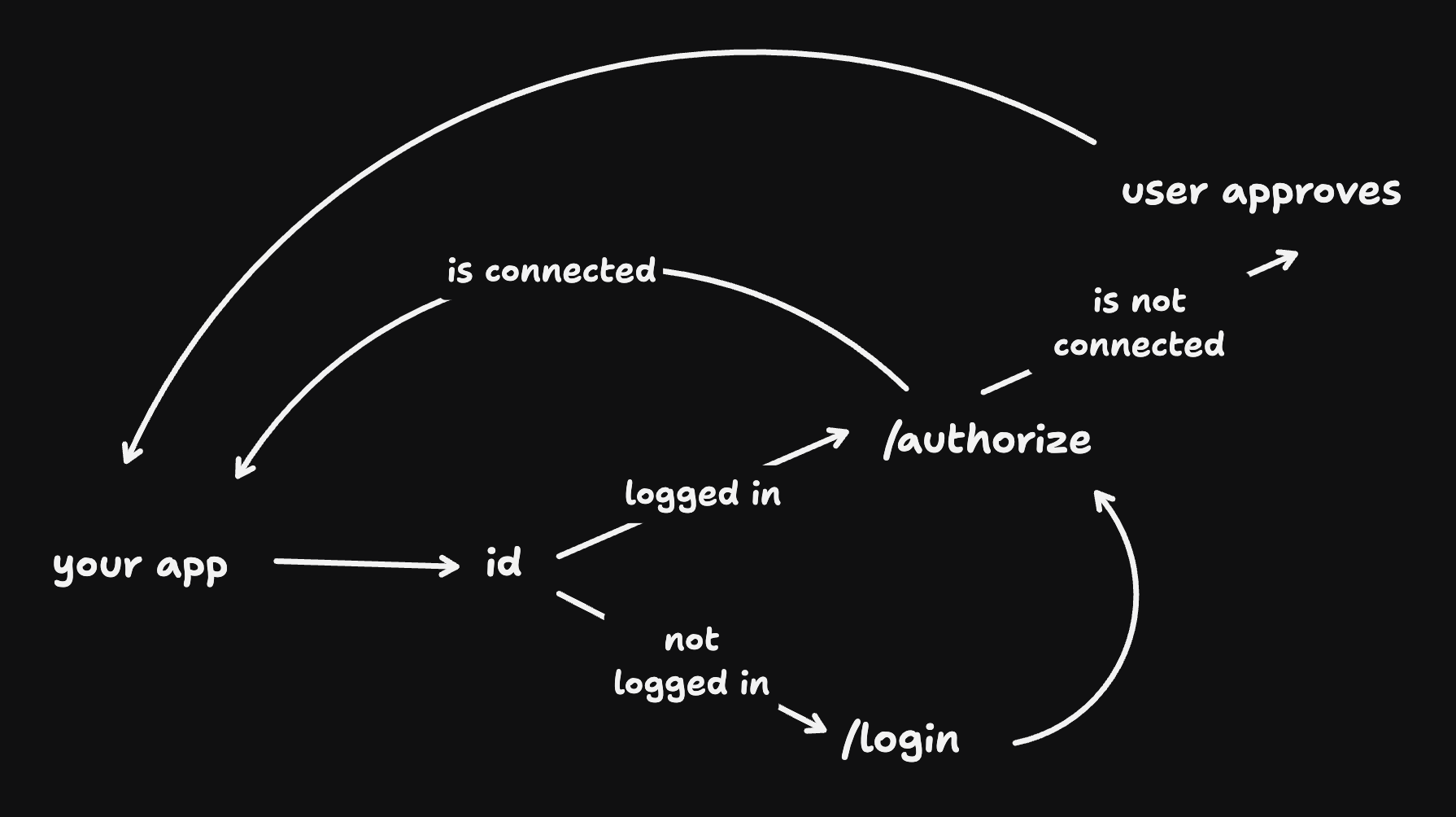 ### Authorization
First, an application redirects the user to the Authorization Server. Here, the user enters their login credentials of their existing account (e.g., Google, Apple, BasicID, etc.), and explicitly grants permissions to your app.
The benefit of using a service for Authorization is that they handle storing user credentials securely, validating passwords, account recovery, etc.
The Authorization Server then issues an authorization code to the application, which has a one-time use and is exchanged for an access token (also known as JWTs) and a refresh code.
These tokens and codes should be extracted from the callback URL and are generally stored in your user's cache or cookies.
### Access tokens
Access tokens are a short-lived JWT (with Basic, this is 1 hour) that can be used to make secure and authenticated requests to protected information. They are used to make requests to the API via the `Authorization` header (e.g., `Authorization: Bearer 'YOUR_ACCESS_TOKEN'`).
Before making a request, you should validate if the access token is still valid - if it has expired, you would use the refresh token to get a new access token without requiring the user to re-authenticate (i.e., without re-entering their login credentials).
### Refresh code
Refresh codes can be used to obtain a new access token via the `/token` endpoint when the current access token expires. This regenerates a new access token and refresh code.
***
# Required parameters
Here are the required parameters you need to set on the "Sign in with Basic" button:
* `client_id`
* `redirect_uri`
* `response_type`
* `scope`
* `state`
### client\_id
Your application's client ID from [admin.basic.tech](https://admin.basic.tech) (project settings).
### redirect\_uri
This is the URL that the user will be redirected to after they sign up or sign in. This would generally be a URL on your app.
### response\_type
This must always be set to `code`, so that you can receive and extract an authorization code in the callback URL.
### scope
Scopes are used to specify the information that your application requires. For Basic, you can specify `profile` to request the user's email address and other information.
### state
The state parameter is used to prevent CSRF attacks. It is a random string that is used to verify that the callback request is legitimate. It is recommended that you use a secure random string generator to generate a state parameter, and that you verify that the state parameter that you receive in the callback URL is the same as the one you sent.
### PKCE (optional, recommended)
SHA-256 hash of your `code_verifier`, base64url-encoded. Send together with `code_challenge_method=S256` on `/auth/authorize`, then send the original `code_verifier` in the body of `POST /auth/token` when exchanging the code.
The [REST quickstart](/basic-restapi/basic-api) and the [redirect-to-sign-in API reference](/api-reference/auth/redirect-to-sign-in) describe the full parameter set.
### Authorization
First, an application redirects the user to the Authorization Server. Here, the user enters their login credentials of their existing account (e.g., Google, Apple, BasicID, etc.), and explicitly grants permissions to your app.
The benefit of using a service for Authorization is that they handle storing user credentials securely, validating passwords, account recovery, etc.
The Authorization Server then issues an authorization code to the application, which has a one-time use and is exchanged for an access token (also known as JWTs) and a refresh code.
These tokens and codes should be extracted from the callback URL and are generally stored in your user's cache or cookies.
### Access tokens
Access tokens are a short-lived JWT (with Basic, this is 1 hour) that can be used to make secure and authenticated requests to protected information. They are used to make requests to the API via the `Authorization` header (e.g., `Authorization: Bearer 'YOUR_ACCESS_TOKEN'`).
Before making a request, you should validate if the access token is still valid - if it has expired, you would use the refresh token to get a new access token without requiring the user to re-authenticate (i.e., without re-entering their login credentials).
### Refresh code
Refresh codes can be used to obtain a new access token via the `/token` endpoint when the current access token expires. This regenerates a new access token and refresh code.
***
# Required parameters
Here are the required parameters you need to set on the "Sign in with Basic" button:
* `client_id`
* `redirect_uri`
* `response_type`
* `scope`
* `state`
### client\_id
Your application's client ID from [admin.basic.tech](https://admin.basic.tech) (project settings).
### redirect\_uri
This is the URL that the user will be redirected to after they sign up or sign in. This would generally be a URL on your app.
### response\_type
This must always be set to `code`, so that you can receive and extract an authorization code in the callback URL.
### scope
Scopes are used to specify the information that your application requires. For Basic, you can specify `profile` to request the user's email address and other information.
### state
The state parameter is used to prevent CSRF attacks. It is a random string that is used to verify that the callback request is legitimate. It is recommended that you use a secure random string generator to generate a state parameter, and that you verify that the state parameter that you receive in the callback URL is the same as the one you sent.
### PKCE (optional, recommended)
SHA-256 hash of your `code_verifier`, base64url-encoded. Send together with `code_challenge_method=S256` on `/auth/authorize`, then send the original `code_verifier` in the body of `POST /auth/token` when exchanging the code.
The [REST quickstart](/basic-restapi/basic-api) and the [redirect-to-sign-in API reference](/api-reference/auth/redirect-to-sign-in) describe the full parameter set.