> ## Documentation Index
> Fetch the complete documentation index at: https://docs.basic.tech/llms.txt
> Use this file to discover all available pages before exploring further.
# Why Basic?
 Basic is a backend for **user-owned data**: each end user gets a dedicated datastore in the cloud, with OAuth sign-in, sync, and clear permission boundaries. Apps read and write that data through SDKs or HTTP APIs instead of running a separate database for every customer.
It fits products that need **personalization, cross-app context, or agents**—anywhere user-specific state should stay portable and under the user’s control.
## Problem
Typical app backends centralize user data with the vendor:
* **Fragmentation**: The same person’s data is copied and isolated per app.
* **Lock-in**: Hard to move data or reuse it across tools the user already uses.
* **Privacy and risk**: One breach or policy change affects many users at once.
* **Operational load**: You scale storage, backups, and compliance for all users’ rows in one place.
## What we optimize for
1. **User-owned stores**: Data is tied to the user; apps request access instead of owning the canonical copy.
2. **Portability**: Users can bring the same datastore to multiple apps that integrate Basic, within the permissions they grant.
3. **Built-in auth and scopes**: Sign-in and tokens reflect what each app is allowed to do.
4. **Developer speed**: Schema-as-code, client SDKs with local-first sync where supported, and REST for any stack.
We also care that the platform is **easy to adopt** (quick project setup, familiar document-style collections), **typed at the schema layer**, and **elastic** as your user base grows.
***
## How Basic differs
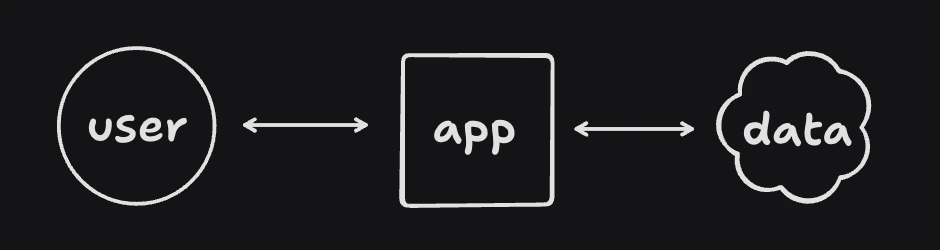
Traditionally, your app hosts one database and all user rows live there:
Basic is a backend for **user-owned data**: each end user gets a dedicated datastore in the cloud, with OAuth sign-in, sync, and clear permission boundaries. Apps read and write that data through SDKs or HTTP APIs instead of running a separate database for every customer.
It fits products that need **personalization, cross-app context, or agents**—anywhere user-specific state should stay portable and under the user’s control.
## Problem
Typical app backends centralize user data with the vendor:
* **Fragmentation**: The same person’s data is copied and isolated per app.
* **Lock-in**: Hard to move data or reuse it across tools the user already uses.
* **Privacy and risk**: One breach or policy change affects many users at once.
* **Operational load**: You scale storage, backups, and compliance for all users’ rows in one place.
## What we optimize for
1. **User-owned stores**: Data is tied to the user; apps request access instead of owning the canonical copy.
2. **Portability**: Users can bring the same datastore to multiple apps that integrate Basic, within the permissions they grant.
3. **Built-in auth and scopes**: Sign-in and tokens reflect what each app is allowed to do.
4. **Developer speed**: Schema-as-code, client SDKs with local-first sync where supported, and REST for any stack.
We also care that the platform is **easy to adopt** (quick project setup, familiar document-style collections), **typed at the schema layer**, and **elastic** as your user base grows.
***
## How Basic differs
Traditionally, your app hosts one database and all user rows live there:
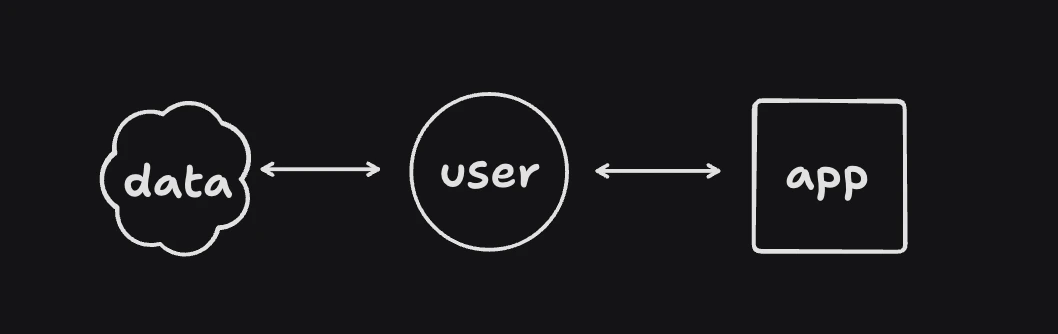
 With Basic, each user has their own datastore; your app uses APIs and SDKs against that federated model:
 ### For users
1. **Control**: Revoke or narrow app access when they want.
2. **One place for their data**: Fewer duplicate profiles and silos.
3. **Sync and offline** (with client SDKs): Work locally; sync when online.
4. **Less vendor dependency**: Their data isn’t only inside one app’s servers.
### For developers
1. **Less central DB to scale**: Heavy reads/writes move to a model aligned with per-user stores.
2. **Security posture**: Sensitive payloads can stay scoped to user stores and tokens.
3. **Faster integration**: Auth, schema, and CRUD patterns are consistent across React, Next.js, Expo, and REST.
## How it works
### Auth
OAuth 2.0 (with PKCE where applicable). Users sign in through Basic; your app receives tokens with agreed scopes. Client SDKs wrap the flow; for custom stacks, see [Basic Auth](/readings/auth-basic).
### Data model
Today, projects define **collections** of JSON-shaped documents in `basic.config` (similar in spirit to Firebase or MongoDB collections), with indexed fields for sync and queries. The important difference is **per-user isolation** and **local-first clients** where you use the sync SDK.
***
For a product-focused overview, start with [What is Basic?](/get-started/welcome). For architecture detail, see [Personal data stores](/readings/personal-data-stores) and [Local-first sync](/readings/local-first-sync).
### For users
1. **Control**: Revoke or narrow app access when they want.
2. **One place for their data**: Fewer duplicate profiles and silos.
3. **Sync and offline** (with client SDKs): Work locally; sync when online.
4. **Less vendor dependency**: Their data isn’t only inside one app’s servers.
### For developers
1. **Less central DB to scale**: Heavy reads/writes move to a model aligned with per-user stores.
2. **Security posture**: Sensitive payloads can stay scoped to user stores and tokens.
3. **Faster integration**: Auth, schema, and CRUD patterns are consistent across React, Next.js, Expo, and REST.
## How it works
### Auth
OAuth 2.0 (with PKCE where applicable). Users sign in through Basic; your app receives tokens with agreed scopes. Client SDKs wrap the flow; for custom stacks, see [Basic Auth](/readings/auth-basic).
### Data model
Today, projects define **collections** of JSON-shaped documents in `basic.config` (similar in spirit to Firebase or MongoDB collections), with indexed fields for sync and queries. The important difference is **per-user isolation** and **local-first clients** where you use the sync SDK.
***
For a product-focused overview, start with [What is Basic?](/get-started/welcome). For architecture detail, see [Personal data stores](/readings/personal-data-stores) and [Local-first sync](/readings/local-first-sync).